


Power Savers: Manage, Plan and save electricity.
Overview
Amidst the growing concern about increasing electricity consumption and its environmental impacts, there is a pressing need to revolutionize how individuals interact with and understand their energy usage. How can we develop a user-centric application that accurately tracks and visualizes electricity consumption and fosters a sense of community and motivation among users to reduce their energy footprint, ultimately contributing to environmental conservation and financial savings?
Problem Statement
I served as the UX/UI Designer and Scrum Master for the Interaction Design Studio class project, which means that I was responsible for working on the Lean UX lifecycle of the product development, including planning and executing:
Creating Hypothesis and Problem Statement
Competitor Analysis
Branding & Design System
MVP Hi-Fi design & development
Usability testing
Action
Team Members
Finney Wang, Rubisha Singh Shah, Irene Yang & Elizabeth Kim.
The Solution
Power Savers is a noble application that tracks and visualizes energy usage, fosters social interaction and provides incentives for energy conservation. This solution empowers users to reduce their electricity consumption, providing financial savings and environmental benefits.
Timeline: The team was able to spin up an MVP in just 12 weeks.
No time to read through it?
Sprint 1

Lean UX: Problem Exploration and Hypothesis Building.
-
We have seen that with the rise of “Work at home,” the amount of fossil-heavy electricity usage has increased. According to Geoscience Australia (2022), Coal is Australia's primary energy source, responsible for 40% of energy-related emissions. The effect of this can be seen in the effects of climate change, such as rising temperatures, shifting rainfall patterns and rising sea levels.
Moreover, In the realm of home living, a 2020 survey unveiled a striking statistic: the average American household boasted access to over ten interconnected devices (Device, 2020). As a team, our mission was to enhance people working from home to have a quality of life within their homes.
-
We believe that staying and work-from-home culture has increased over time due to post-pandemic effects. In this scenario, people are using more electricity than before. Therefore, our assumption is that “The users cannot keep track of their energy usage, and as a result, pay high bills.”
Next, Embracing Lean UX principles, we've formulated a hypothesis to test and refine our solution over five sprints continuously.
-
As global warming becomes a pressing issue, it's essential for individuals to reduce their carbon footprint. This app helps users monitor their daily, weekly, and monthly electricity usage and encourages them to save energy. Users can share their achievements on the app's social platform.
Our hypothesis is that this app will make users more aware of their energy use, motivate them with vouchers, and inspire a community effort to create a greener world.
Sprint 2
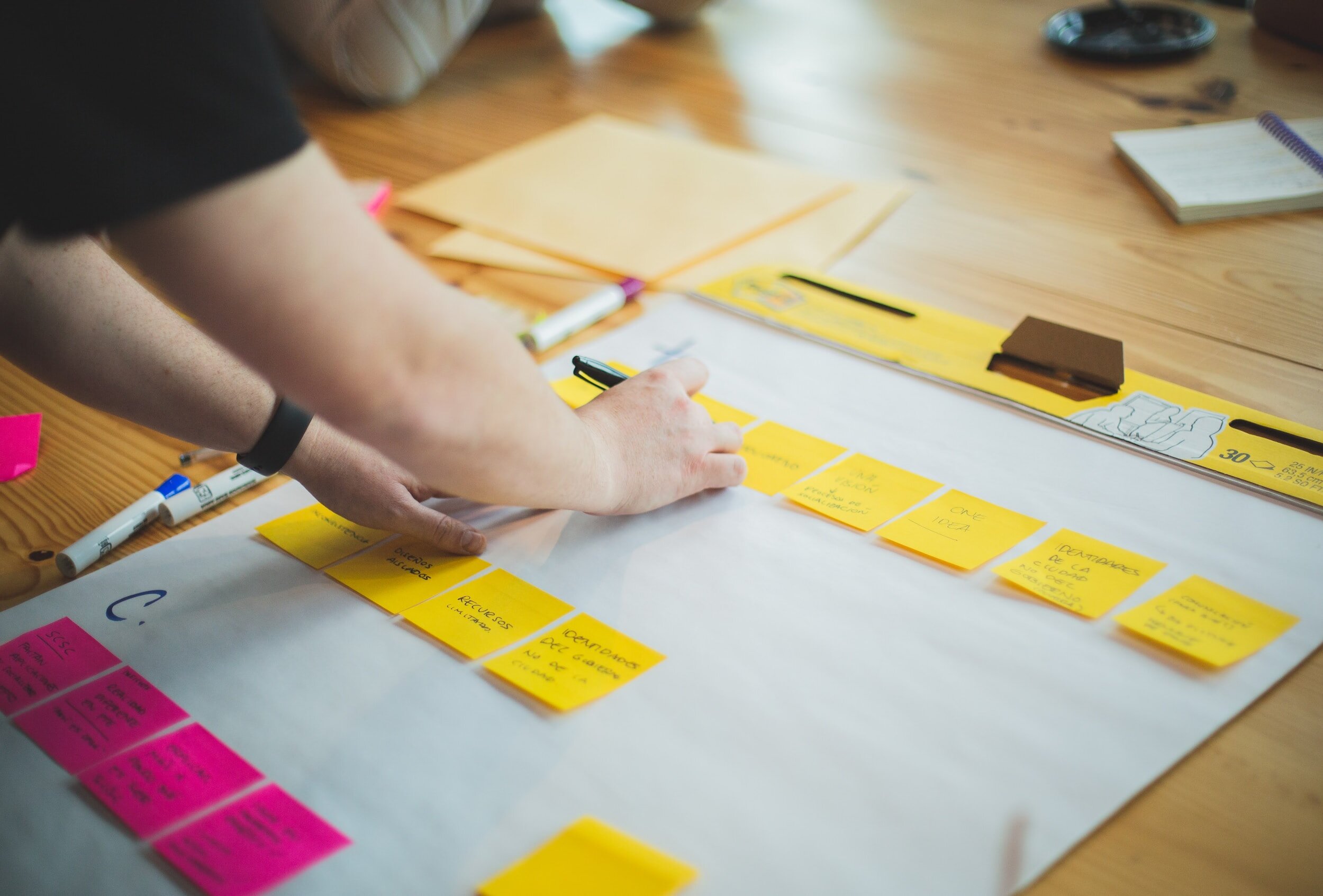
‘The Team’, ‘The Measurement’ and ‘The Process.’
-
As a Scrum Master, I began by harnessing our team's inherent strengths. To achieve this, I led a SWOT analysis of our team members. When planning our Minimum Viable Product (MVP), I strategically assigned roles aligned with each member’s interests and strengths, fostering effective “collaboration.”
This approach allowed me to embark on our idea-building journey with a great team and a comprehensive perspective to measure our success based on “outcomes.”
As a result, it provided us with a holistic approach to building our ideas, identifying gaps in our process by understanding the problem, and validating why our solution provides value, utilizing the “build, measure, learn” technique.
Comperative Analysis
Firstly, based on our Assumptions, we analyzed 10+ energy-tracking apps and physical devices available in the market in subsequent sprints. This comperative analysis aimed to assess market similarities and identify potential differentiators for our proposed product.
I created specific criteria to evaluate these competitors based on our product's suggested features, and I conducted a detailed analysis of 3 key competitors and summarized the findings.


The Analysis revealed that:
For most physical products, it is difficult to visualize what the technical numbers mean regarding carbon emissions and scale.
The major focus was on saving money rather than tracking users’ environmental impact.
None of the apps/products had any social/motivational element.
Therefore, based on this analysis, I defined the Comparative Analysis chart and defined the Problem Statement.

Defined Problem Statement
Our Electricity Tracker Application innovatively monitors daily electricity usage, fosters social sharing and motivation, and offers incentives for energy savings. Existing products fall short, leading to challenges like unclear electricity bills, a lack of motivation, and minimal contributions to the environment.
Our solution aims for success, measured by reduced electricity consumption, user satisfaction, engagement frequency, and increased savings for charitable causes.
Sprint 3

Design Iteration and Vision.
-
I led the development of Proto Personas for our primary users, with valuable input from team members who crafted the final two personas. I refined one based on field study findings and seamlessly integrated it into our design discussions and MVP development, ensuring a solid alignment with user needs.
With the persona in place, our team collaboratively constructed the process to modify from Lo-Fi to mid-fi prototypes.
-
I improved the initial Low-Fi prototypes based on the Usability Testing results. I transitioned to Mid-Fi prototypes, which were then employed in a field study.


-
Finding participants solely focused on energy conservation in our field study proved challenging.
Therefore, Our field studies involved interviews with 12 participants aged 25 and above to understand their energy usage habits with a broader climate-conscious mindset who faced similar challenges.
I organized our research findings and insights into an affinity diagram, categorizing them by lifestyle values, electricity usage patterns, frustrations, current knowledge levels, and motivations. From these categories, five key themes emerged. These themes guided our recommendations for enhancing our prototype to leverage the highlighted insights.


-
The themes that emerged were:
Users often check their electricity usage during the monthly payments.
“I generally have a look at it when I have to pay my electricity bills during the end of month, and sometimes my bills are automatically deducted from my bank account”.
Users are aware of the over electricity usage facts, but never took any steps to maintain or found a solution to do it.
“I always think about it, but never really used anything like an app or something, generally I just switch it off whenever I find some lights or microwave on, that’s it but I know that there are still a lot of times I just forget”.
Saving electricity is valuable as saving any other natural resources for the betterment of the environment.
“Electricity is also very important which we always use without much thinking actually, it’s always good to save anything that can help the environment”.
Users tend to be motivated when they find an emotionally satisfying result for their efforts.
“I remember that once when I was small and used to switch off all lights and fans with my parents before going to sleep, that helped us save a lot of money in the end, and my father gifted me a small keychain with that saved money, I was really happy then, it’s a childhood story..”
Being aware of how much each device uses can be a motivator for positive change.
“It does affect my decision-making, like i said, … i use more fan more than aircon … because i know that fan is more energy saving.”
-
Based on these themes, the best recommendations we came up with are as follows:
Instant notification based on daily usage and ways to reduce it.
Sharing the app within the close network to create more awareness.
Sharing user achievements within social life (peers/colleagues) and introducing a reward system to be motivated continuously.
Sprint 4

Fine tuning the Outcomes.
Mid Fi to Hi Fidelity
To do so, I first modified and designed the User flow before steping into the High-Fidelity prototyping.

Next, define the UI elements and guidelines for the logo, type scale, Iconography, data visualization and Illustration styles. This allowed me to modify the Mid-Fi prototype, fix usability issues, look and feel, and successfully implement user feedback, creating our final solution.


The Solution
Power Savers
Upon completing four successful sprints, we crafted our MVP, 'Power Savers.' This innovative application tracks energy usage, encourages social interaction, and offers incentives for energy conservation. It empowers users to lower their electricity consumption, providing financial savings and environmental benefits.
The Technology - How does it work?

Informed & simple onboarding profile setup for first-time users.
01. Getting Started

Select your home and room types & connect your meter reading*.
02. Personalize home preferences.

* Connects with Powerpal Bluetooth device.
Get real-time energy data with an interactive visualization.
03. View Real-time energy usage.
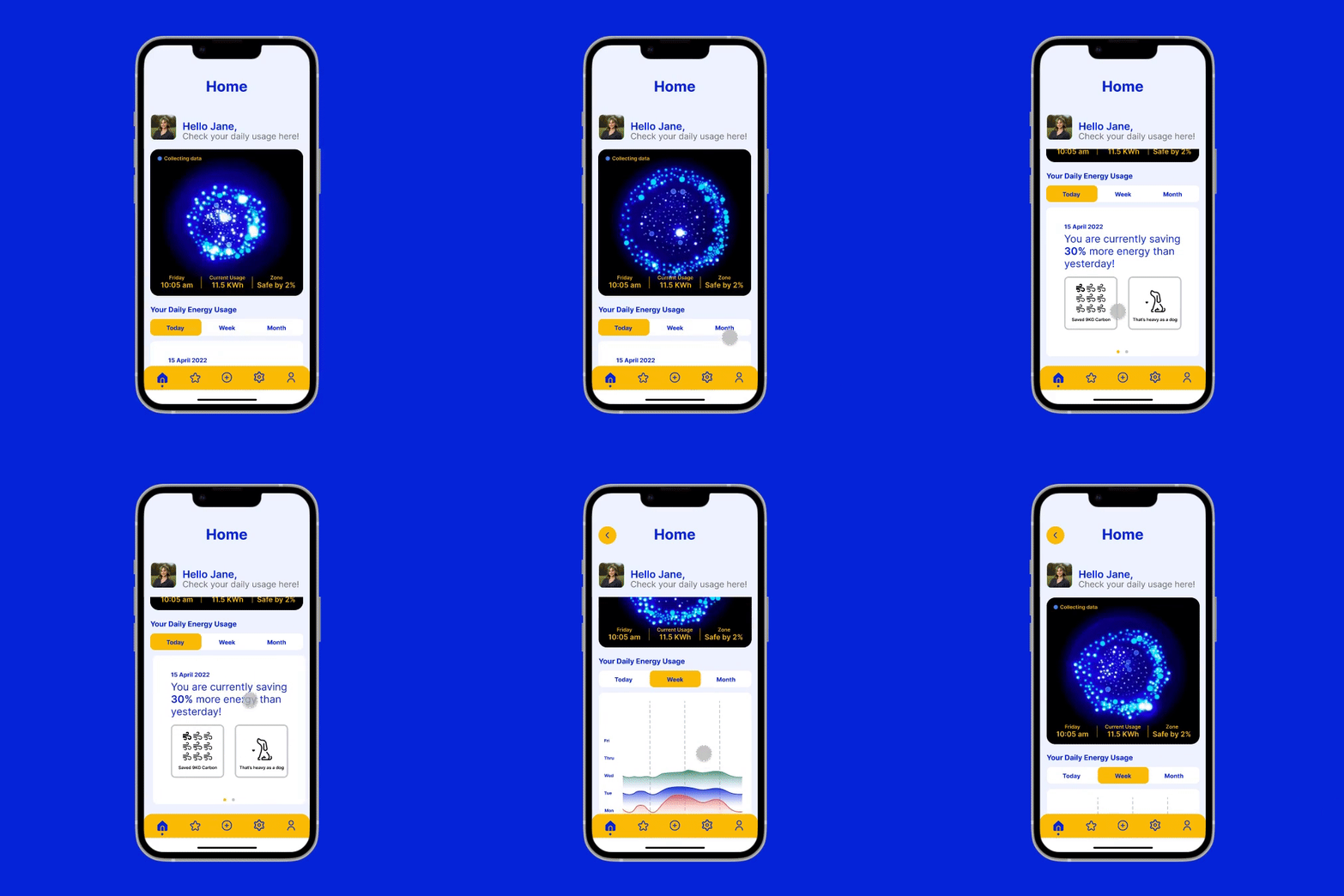
Set preferred energy-saving goals and view excess usage by rooms.
04. Set Power-Saving targets.

View all or add new devices with ease.
05. Device managements.

06. Reedem coupons, Share and Motivate.
Receive reward coupons, share with like-minded peers and be a “star-saver”.

My Learnings
Shift from "Design Thinking" to "Lean UX" Approach.
I thoroughly enjoyed this fresh approach of Lean UX, which emphasizes "doing" rather than "saying." It introduced me to the "Test Driven Development" concept and the value of quickly building, measuring, and learning from product iterations, a shift from my traditional design approaches.
Prioritizing User Validation at the Beginning.
Lean UX challenged my previous design processes by advocating for early validation through interviews and testing of personas. This was a significant departure from my previous reliance on extensive user research as the initial step, opening up new and interesting ways to approach product design.Collaborative Design and Rapid Prototyping.
I learned the value of collaborative design in Lean UX, encouraging me to work effectively within a team, gathering diverse opinions, ideas and decision-making. Additionally, I discovered the importance of quickly creating interactive prototypes, as they facilitated valuable feedback from both team members and assumed personas, improving the overall design process.
Balancing Lean UX with Traditional Practices.
Lastly, I've realized the importance of balancing Lean UX and traditional practices like Human-Centric Design Methods. While Lean UX offers agility and responsiveness, it may sometimes lack a long-term perspective. Integrating traditional approaches, especially in areas such as User Research and Secondary Research, can lead to more robust and sustainable product outcomes, especially when considering user needs and market trends over time.
If you came this long, Thank you for reading!

Other Case Studies
Anatomy VR - Designing web-based VR for first-year medical students to collaborate and study anatomy.
